Placing Orders
Orders are placed through the Order Ticket panel. The ticket adapts based on your trading style and the instrument type.
Equity orders
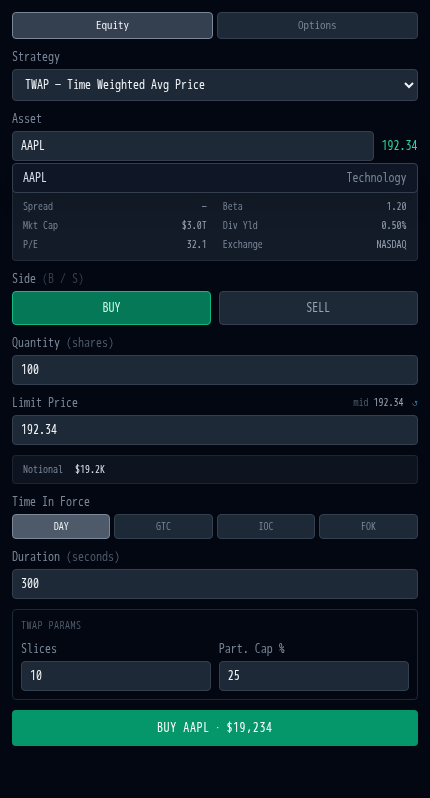
Section titled “Equity orders”- Select an instrument via the Symbol Search or market ladder.
- Choose BUY or SELL.
- Enter a Quantity (shares) and Limit Price.
- Select a Strategy (LIMIT, TWAP, VWAP, POV, ICEBERG, SNIPER, ARRIVAL_PRICE).
- Click Place Order.
Available strategies depend on your trading style. High-touch traders have access to LIMIT and basic algo strategies. Low-touch and algo traders have the full range, including ICEBERG, SNIPER, and ARRIVAL_PRICE.
Strategy parameters
Section titled “Strategy parameters”Each algo strategy exposes additional parameters:
| Strategy | Parameters |
|---|---|
| LIMIT | Limit price only |
| TWAP | Number of slices, participation cap |
| POV | Participation rate, min/max slice size |
| VWAP | Historical volume curve window |
| ICEBERG | Visible quantity per slice |
| SNIPER | Aggression threshold |
| ARRIVAL_PRICE | Slippage tolerance (bps) |
Risk limit warnings
Section titled “Risk limit warnings”The ticket validates your order against your personal trading limits in real time:
- Quantity limit: amber warning if quantity exceeds your max order size.
- Notional limit: amber warning if price multiplied by quantity exceeds your daily notional cap.
Orders that exceed limits show a warning, and the submit button is disabled.
Fixed income orders
Section titled “Fixed income orders”Switch to the Bond tab to place fixed income orders:
- Select a bond from the dropdown (government and corporate bonds).
- Enter a Yield; the platform calculates the bond price.
- Review the computed dirty price and accrued interest.
- Click Submit.
Options orders
Section titled “Options orders”Switch to the Options tab for Black-Scholes priced options:
- Enter a Strike Price.
- Select CALL or PUT.
- Review the computed premium and Greeks (delta, gamma, theta, vega, rho).
- Click Submit.